qBittorrent v4.5.0: The Hitchhiker's Guide to Legible Text
The story so far: In the beginning, qBittorrent was created. Then they released v4.5.0. This has made a lot of people very angry and been widely regarded as a bad move.
(If you just want the theme file with completely white text colors, you can download that here. Place it somewhere safe, then open qBT, and go to Tools > Preferences > Behaviour and check the checkbox for "Use custom UI theme". Then browse to the theme file, click OK, and restart qBT)
Update 2023-03-22: ZippyShare is shutting down, so the link now points to MultiUp, which uploads to multiple services.
The problem
The very bad move in this case, was hard-coding foreground colours, while simultaneously not hard-coding background colours. Most, if not all, operating systems in use today will let you choose a theme for your apps, so you can probably see how this quickly becomes a problem. If your app's hard-coded foreground colour has poor contrast with the user's chosen background colour, the user is gonna have a bad time. Sure, they can change their background colour by changing their theme, but why should the user be forced to change their whole system theme because of one app that disregards user choice? So when the eminent qBT team decided to hard-code only one of these, anyone who uses a dark theme in their OS, immediately got problems.
I am a proud KDE user, and like any proud basement-dwelling nerd, I use a dark theme. This dark theme isn't even an obscure, home-brewed one, it is Breeze Dark, which ships with KDE. This works exceptionally well, and disregarding the odd Java app, it works for all apps, mostly regardless of the UI toolkit used to make them. GTK apps, check. Qt apps, check.
But wait... qBittorrent is a Qt app, right? That's right, qBT is built with Qt on all platforms. This is great both for the developers who only have to deal with one toolkit, and for the users who can expect a more or less consistent experience across platforms.
Now let's move on to the evidence phase. Consider the following. This is a screenshot of qBitTorrent v4.3.9 (or as I like to call it, "pre-fuckening"):
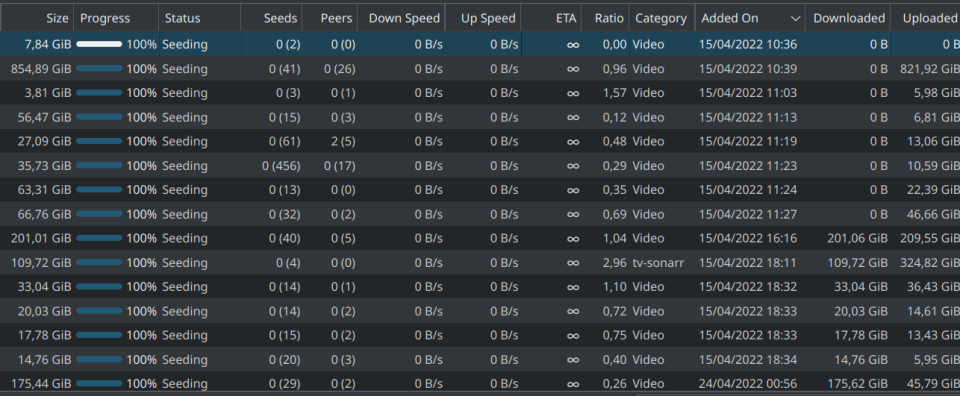
Wow, so legible! White text on a dark gray background has really good contrast, and makes the text stand out, so it's super readable. If I switch to the normal Breeze theme, the background will turn white, and the text will turn black. So logical! It respects my global OS theme! Yay!
But then, through the magic of sudo pkcon update and restarting my computer, on the next launch of qBT, I am met with this horrible sight:
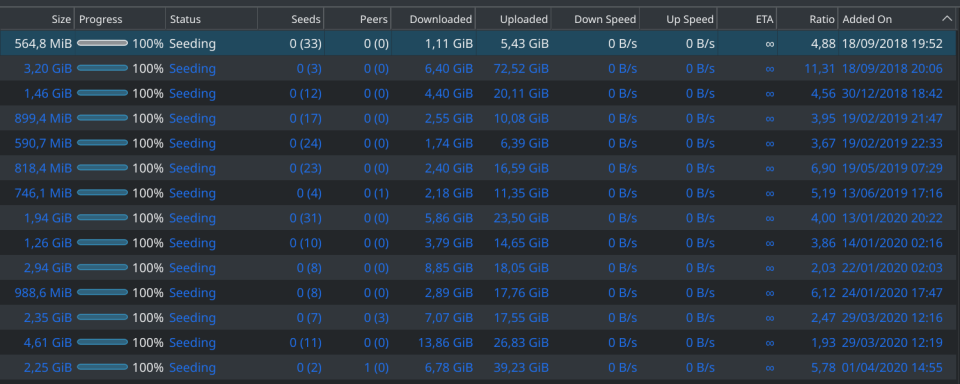
I'm not gonna lie; when I saw this, I let out an audible "what the fuck is this?". Like a lot of people, I have astigmatism and am near-sighted. If you sit right next to your monitor and have 20/20 vision, then yeah, sure, you might be able to read this. But the fact is, over a fourth of the global population currently has some sort of visual impairment, and if they live long enough, literally everyone will develop a vision impairment during their lifetime. The contrast is non-existent; dark blue against a dark gray (or black) background is absolute dogshit for legibility.
Surely, when they decided that L'ard-core Deep Bleu is the new default text colour for everyone, someone must've chimed up with something along the lines of "but let it be optional" or "let's at least include a colour picker or an option to revert to theme-default colours". No. Of course not. That would be dumb and they would not get invited to the proverbial open-source Christmas party.
Put briefly: A normal end user cannot do anything about this without significant effort. No option to revert, no option to change colours, no option to ignore built-in theming and use the OS theme. A normal end user that now cannot read their app anymore will either a) uninstall and use an alternative client, b) downgrade to a previous version, or c) try to find a workaround. All of which are bad for UX. A user should not be forced to downgrade or replace the app in order to read basic, informational text.
The solution
Some web searching will reveal that there are custom themes available for qBT. And that is an okay workaround. The problem is, all these custom themes change the whole look of the application, and thus also ignore the user's system defined theme. But also, v4.5.0 broke most of these custom themes. So, what do we do about this? After trawling through some poorly documented ways of creating themes, I was finally able to make a simple one that only changes the text colors, nothing else. Here is how I did it.
I started here. Which has an okay-ish explanation of how themes work and how the markup is written, but not much info about how to make the actual theme file, until you find the link to this, which is made, quote, "for the easy creation of .qbttheme files". So sure, I download the Python script and attempt to run it, only to be barraged by error messages about missing resources.
I think "whatever" and start working on the actual code. I read through the documentation which tells me stylesheet.qss is required and tells me a bunch of the rules to put in there, but at the end tells me "jk lol disregard all that and put this in your config file instead". What a waste of time. I make an empty stylesheet.qss and populate config.json with the following:
{
    "colors": {
        "TransferList.Downloading": "#FFFFFF",
        "TransferList.StalledDownloading": "#FFFFFF",
        "TransferList.DownloadingMetadata": "#FFFFFF",
        "TransferList.ForcedDownloading": "#FFFFFF",
        "TransferList.Allocating": "#FFFFFF",
        "TransferList.Uploading": "#FFFFFF",
        "TransferList.StalledUploading": "#FFFFFF",
        "TransferList.ForcedUploading": "#FFFFFF",
        "TransferList.QueuedDownloading": "#FFFFFF",
        "TransferList.QueuedUploading": "#FFFFFF",
        "TransferList.CheckingDownloading": "#FFFFFF",
        "TransferList.CheckingUploading": "#FFFFFF",
        "TransferList.CheckingResumeData": "#FFFFFF",
        "TransferList.PausedDownloading": "#FFFFFF",
        "TransferList.PausedUploading": "#FFFFFF",
        "TransferList.Moving": "#FFFFFF",
        "TransferList.MissingFiles": "#FFFFFF",
        "TransferList.Error": "#FFFFFF"
    }
}
As you can probably tell, I copy pasted the list from the documentation and made all the text colours pure white. That's the only change I want, because it's the only forced change that made a huge difference to someone who can't tell a frog from a lawn chair, without glasses.
Great! Now I have a zero-byte stylesheet.qss and a config.json with some actual changes in it. Let's get it packed up into a .qbtheme!
Oh, right. The python script spat out a bunch of errors. I don't know Python, but I know other programming languages, and I'm generally able work my way around this sort of stuff. Apparently the errors are because you don't need just this script, you need to clone the whole repository, which isn't mentioned anywhere. Fine, one git clone https://github.com/jagannatharjun/qbt-theme later, I have a directory full of god knows what. I cd to the right directory and try again, with the following syntax:
python make-resource.py -style stylesheet.qss -config config.json
But in return, I get this:
/Builds/tools/rcc -binary -o style.qbtheme resources.qrc
Traceback (most recent call last):
  File "make-resource.py", line 80, in <module>
    if not subprocess.call(cmd):
  File "/usr/lib/python2.7/subprocess.py", line 172, in call
    return Popen(*popenargs, **kwargs).wait()
  File "/usr/lib/python2.7/subprocess.py", line 394, in __init__
    errread, errwrite)
  File "/usr/lib/python2.7/subprocess.py", line 1047, in _execute_child
    raise child_exception
OSError: [Errno 2] No such file or directory
(Note the beautifully named python function _execute_child, which is coincidentally what I want to do when I have to spend time on debugging code for a language I don't know)
Right. Line 80 it says. Line 80 of make-resource.py reads as follows:
if not subprocess.call(cmd):
Clearly, cmd is a variable, which is coincidentally defined a few lines above, on line 77:
cmd = [os.path.join(os.path.dirname(os.path.realpath(__file__)), 'tools/rcc'), '-binary', '-o', args.output, 'resources.qrc']
What I gather from this, is that the script is attempting to call a binary located at tools/rcc. But the error Python spits out is No such file or directory, do I have to supply this mysterious binary myself? Huh? That's when I decide to look inside the tools directory.
$ ls -lah
total 1,1M
drwxrwxr-x 2 lars lars 4,0K Jan  3 12:34 .
drwxrwxr-x 8 lars lars 4,0K Jan  3 12:35 ..
-rw-rw-r-- 1 lars lars 1,1M Jan  3 12:34 rcc.exe
rcc.exe. Real bruh moment. Instead of checking for OS or giving a useful error message, this repository bundles a Windows binary of rcc. But what is rcc I wonder? A web search tells me that rcc stands for Renal cell carcinoma, and I'm sure if I keep reading, I'll find out I have it. I have a big brain moment and add "qt" to the search, and find out that RCC is the Qt Resource Compiler. That makes sense, and I probably have this somewhere already since I run KDE, right?
$ whereis rcc
rcc: /usr/bin/rcc
Yay, I already have it installed on my system! I change line 77 of make-resource.py to:
cmd = ['rcc', '-binary', '-o', args.output, 'resources.qrc']
I save make-resource.py as a new file, then run it again with the appropriate arguments, and voilà! It works!
$ python make-resource-linux.py -style stylesheet.qss -config config.json
adding ./make-resource-linux.py
adding ./config.json
adding ./stylesheet.qss
[]
rcc -binary -o style.qbtheme resources.qrc
resources.qrc: Warning: potential duplicate alias detected: 'stylesheet.qss'
resources.qrc: Warning: potential duplicate alias detected: 'config.json'
For some reason the script added itself to the resource file, but whatever. I save the resulting .qbtheme-file as ~/.local/bin/style.qbtheme for safekeeping, then I apply the theme in qBittorrent.
Tada! It works!
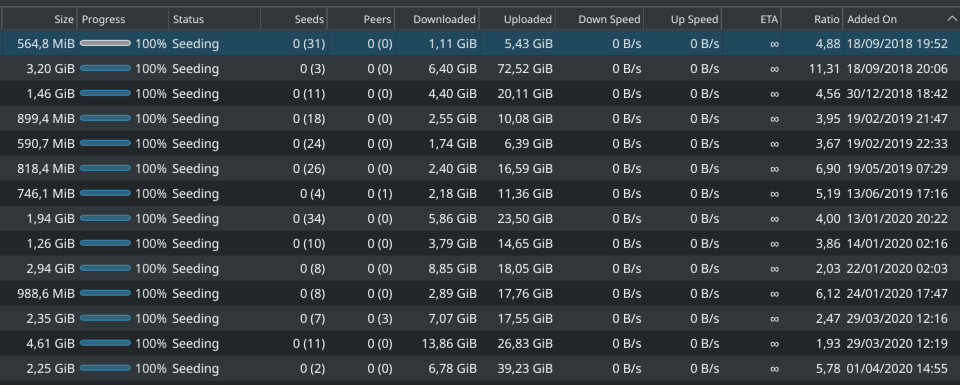
Doesn't that look just positively lovely?
The conclusion
Now, this task, making previously white text white again, took me, a technical person, a non-negligible amount of time to figure out (on the magnitude of an hour or two). How is it expected that a normal, non-technical end user is supposed to accomplish this same task before the heat death of the universe? Why do they have to in the first place?
Please, for the love of all that is good and decent in this world, the next time you force a visual change upon users, include a colour picker option to let the user override your choices, or, you know, respect the system theme. I appreciate that qBT is free and open-source software and that resources are limited, but this is UX 101. If you define one colour, you have to define all colours. The best is to define none and let the user decide. Don't get me wrong, credit where credit is due: I love qBittorrent with a passion, and it is one of my single most-used pieces of software. Functionally, it is fantastic. That being said, hard-coding colours was a bad move.
You can download the resulting all-white-text .qbtheme-file here. Place it somewhere safe, then open qBT, and go to Tools > Preferences > Behaviour and check the checkbox for "Use custom UI theme". Then browse to the theme file, click OK, and restart qBittorrent.